Flutter:缩放布局组件FittedBox
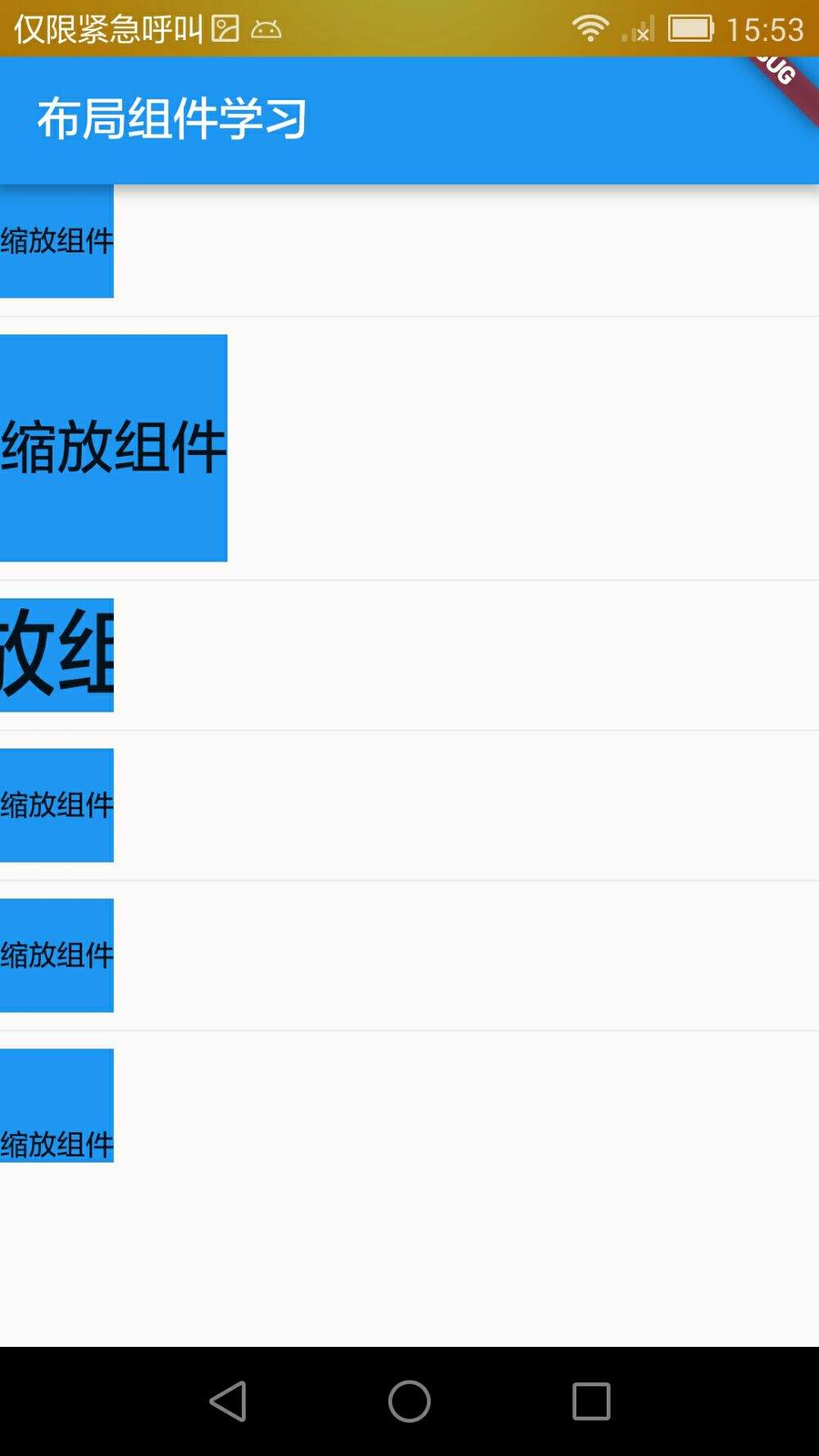
缩放布局组件FittedBox主要有两个功能:缩放和位置调整。FittedBox会根据自己的尺寸来调整child的尺寸。
使用FittedBox需要用到两个常用的属性,fit缩放方式,跟前面学到的Image组件的填充方式一致,其次就是alignment对齐方式。
import 'package:flutter/material.dart';

class DemoFittedBox extends StatelessWidget {
  @override
  Widget build(BuildContext context) {
    return Column(
      crossAxisAlignment: CrossAxisAlignment.start,
      children: <Widget>[
        Container(
          width: 50.0,
          height: 50.0,
          color: Colors.blue,
          child: FittedBox(
            child: Text('缩放组件'),
          ),
        ),
        Divider(),
        Container(
          width: 100.0,
          height: 100.0,
          color: Colors.blue,
          child: FittedBox(
            child: Text('缩放组件'),
          ),
        ),
        Divider(),
        Container(
          width: 50.0,
          height: 50.0,
          color: Colors.blue,
          child: FittedBox(
            fit: BoxFit.cover,
            child: Text('缩放组件'),
          ),
        ),
        Divider(),
        Container(
          width: 50.0,
          height: 50.0,
          color: Colors.blue,
          child: FittedBox(
            fit: BoxFit.fitWidth,
            child: Text('缩放组件'),
          ),
        ),
        Divider(),
        Container(
          width: 50.0,
          height: 50.0,
          color: Colors.blue,
          child: FittedBox(
            fit: BoxFit.contain,
            child: Text('缩放组件'),
          ),
        ),
        Divider(),
        Container(
          width: 50.0,
          height: 50.0,
          color: Colors.blue,
          child: FittedBox(
            fit: BoxFit.scaleDown,
            alignment: Alignment.bottomCenter,
            child: Text('缩放组件'),
          ),
        ),
      ],
    );
  }
}
热门标签
每日一句
-
新松恨不高千尺,恶竹应须斩万竿。
——杜甫
今日排行
- OpenCV-Python边缘检测:Sobel、Scharr、Laplacian算子和Canny算子
 图像梯度计算的是图像变化的速度。对于图像的边缘部分,其灰度值变化较大,梯度值也较大;相反,对于图像中比较平滑的部分,其灰度值变化较小,相应的梯度值也较小。图像梯度计算需要求导数,但是图像梯度一般通过计算像素值的差来得到梯度的近似值(近似导数值)。本节主要介绍Sobel算子、Scharr算子、Laplacian算子和Canny算子的使用.
 - Iris框架打包成二进制文件(包含静态文件)
 最近在使用Golang的WEB框架Iris做了一个小的系统,但是里面有一些静态的资源,如css、js、html文件,如果只是通过go build打包的这些静态文件是打包不进去的,所以本文主要记录下如何将所以文件都打包的二进制文件中。
 - Redis键管理
 首先我们通过fake2db生成一批测试数据,生成过程查看《Python常用包整理-fake2db:一个生成测试数据的工具》
 - 音乐推荐《精忠报国》
 《精忠报国》是歌手屠洪刚演唱的一首歌曲。由陈涛作词,张宏光作曲。收录在屠洪刚1999年发行的同名专辑《精忠报国》里。歌曲内容反应了南宋抗金名将岳飞的戎马一生,歌颂岳飞精忠报国的强烈爱国主义精神。该曲也是何中华、俞飞鸿等主演古龙武侠剧《三少爷的剑》的片尾曲。
 - Flutter布局基础示例
 通过学习Flutter的布局,可以通过ListView、Container、Row、Column等组件来对界面进行布局。
点击排行
- VSCode插件 - 快速生成表格并格式化
 快速生成表格
 - Electron页面跳转、浏览器打开链接和打开新窗口
 Electron页面跳转、浏览器打开链接和打开新窗口
 - Electron打包错误“Error: Application entry file ..”解决方案
打包出现如下错误:Error: Application entry file "dist\electron\main.js" in the "D:\gui\demo2\build\win-unpacked\resources\app.asar" does not exist. Seems like a wrong configuration.
- mac git用户名和密码修改
 在Mac电脑中,如何对Git的用户名和密码进行修改呢?起初不懂Mac,所以整了很久,本文将记录如何对这个进行操作,以便后期使用。
 - Git保存和清除用户名、密码
 在使用Git的过程中,不想每次都输入用户名和密码去拉取代码,所以就需要保存这些信息,那么既然有保存了,就必须有清除功能。
 - Docker编译出现:temporary error (try again later)
 Docker编译镜像出现:fetch http://dl-cdn.alpinelinux.org/alpine/v3.12/main/x86_64/APKINDEX.tar.gz
ERROR: http://dl-cdn.alpinelinux.org/alpine/v3.12/main: temporary error (try again later)
WARNING: Ignoring APKINDEX.2c4ac24e.tar.gz: No such file or directory问题
Docker编译镜像出现:fetch http://dl-cdn.alpinelinux.org/alpine/v3.12/main/x86_64/APKINDEX.tar.gz
ERROR: http://dl-cdn.alpinelinux.org/alpine/v3.12/main: temporary error (try again later)
WARNING: Ignoring APKINDEX.2c4ac24e.tar.gz: No such file or directory问题