PHP框架项目中生成表结构
github地址:https://github.com/sclzzhanghaijun/db_schema
db_schema
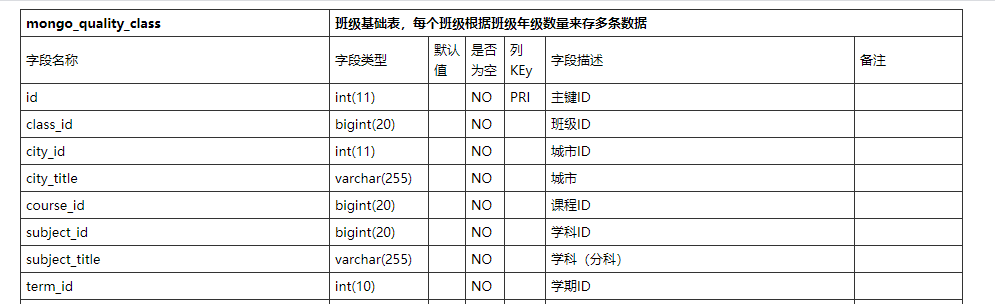
本项目主要是生成Mysql的表结构,返回Html,可以自定义显示table样式。支持所有php项目,只需要实现数据查询方法。
安装
composer require sclzzhanghaijun/db_schema
Laravel使用
<?php

namespace App\Console\Commands;

use Illuminate\Console\Command;
use Illuminate\Support\Facades\DB;
use SCLZZHJ\Schema\Schema;
use SCLZZHJ\Schema\SchemaInterFace;

//实现接口
class DBSchema implements SchemaInterFace
{
    public function SqlExec($sql)
    {
        $result =  DB::select($sql);
        if($result){
            $result = $this->object_array($result);
        }
        return $result;
    }

    //需要将对象转换为数组
    public function object_array($array) {
        if(is_object($array)) {
            $array = (array)$array;
        } if(is_array($array)) {
            foreach($array as $key=>$value) {
                $array[$key] = $this->object_array($value);
            }
        }
        return $array;
    }
}

//使用命令方式调用
class SchemaCommand extends Command
{
    protected $signature = 'make:table_schema';
    protected $description = '生成数据表结构';

    public function __construct()
    {
        parent::__construct();
    }

    public function handle()
    {
        $schema = new Schema(new DBSchema(), config('database.connections.mysql.database'));
        try {
            $table = $schema->make();
            $html = <<<EOF
    <html lang="zh">
    <meta http-equiv="Content-Type" content="text/html; charset=utf-8" />
    <style ="text/css">
    /*table start*/
    table{
        /* -moz-border-radius: 5px;
        -webkit-border-radius:5px;
        border-radius:5px; */
        margin: auto;
        width: 50%;
        border:solid #333;
        border-width:1px 0px 0px 1px;
        font-size: #333;
        border-collapse: collapse;
        border-spacing: 0;
        font-size: 13px;
    }
    table tbody tr{
        height: 20px;
        line-height: 20px;
    }
    table tbody tr.odd{
        background-color: #fff;
    }
    table tbody tr.even{
        background-color: #F5F5F5;
    }
    table tbody tr:hover{
        background-color: #eee;
    }
    table tbody tr th,table tbody tr td{
        padding:3px 5px;
        text-align: left;
        /* border: 1px solid #ddd; */
        border:solid #333;
        border-width:0px 1px 1px 0px;
    }
    table tbody tr th{
        font-weight: bold;
        text-align: center;
    }
    table tbody tr td a:hover{
        color:#0080c0;
    }
    /*table end*/
</style>
EOF;
            $html .= "<body>" . $table . "</body></html>";
            file_put_contents("./index.html", $html);
        } catch (\Exception $exception) {
            echo $exception->getMessage();
        }
    }
}
最终效果

热门标签
每日一句
-
生活,是一种缓缓如夏日流水般地前进,我们不要焦急我们三十岁的时候,不应该去急五十岁的事情,我们生的时候,不必去期望死的来临,这一切,总会来的。
——三毛
今日排行
- Laravel使用MongoDB复杂的查询
 在使用Laravel中如果要进行复杂的查询,那么通过模型中的函数来查询是不行的,所以本文主要记录如何通过aggregate来进行复杂的查询。
 - 速查表
 速查表是自己整理了一份在工作中常用的一些资料,包含了自己在日常开发中需要常常用到的相关技术。可以给读者进行参考。
 - Python调用WPS把文档转换PDF,并把PDF转图片
 Python调用WPS把文档转换PDF,并把PDF转图片,首先需要安装WPS,然后利用pypiwin32把文档转化成PDF,再利用fitz、PyMuPD把PDF转化成图片
 - Centos中用Chrome将网页导出为PDF
 Centos中用Chrome将网页导出为PDF,chrome --headless --print-to-pdf https://developer.chrome.com/
 - pip国内镜像源
默认情况下 pip 使用的是国外的镜像,在下载的时候速度非常慢,本文我们介绍使用国内源对pip进行加速。
点击排行
- VSCode插件 - 快速生成表格并格式化
 快速生成表格
 - Electron页面跳转、浏览器打开链接和打开新窗口
 Electron页面跳转、浏览器打开链接和打开新窗口
 - Electron打包错误“Error: Application entry file ..”解决方案
打包出现如下错误:Error: Application entry file "dist\electron\main.js" in the "D:\gui\demo2\build\win-unpacked\resources\app.asar" does not exist. Seems like a wrong configuration.
- mac git用户名和密码修改
 在Mac电脑中,如何对Git的用户名和密码进行修改呢?起初不懂Mac,所以整了很久,本文将记录如何对这个进行操作,以便后期使用。
 - Git保存和清除用户名、密码
 在使用Git的过程中,不想每次都输入用户名和密码去拉取代码,所以就需要保存这些信息,那么既然有保存了,就必须有清除功能。
 - Docker编译出现:temporary error (try again later)
 Docker编译镜像出现:fetch http://dl-cdn.alpinelinux.org/alpine/v3.12/main/x86_64/APKINDEX.tar.gz
ERROR: http://dl-cdn.alpinelinux.org/alpine/v3.12/main: temporary error (try again later)
WARNING: Ignoring APKINDEX.2c4ac24e.tar.gz: No such file or directory问题
Docker编译镜像出现:fetch http://dl-cdn.alpinelinux.org/alpine/v3.12/main/x86_64/APKINDEX.tar.gz
ERROR: http://dl-cdn.alpinelinux.org/alpine/v3.12/main: temporary error (try again later)
WARNING: Ignoring APKINDEX.2c4ac24e.tar.gz: No such file or directory问题